Hosted Payment Pages vs. API Integration Image

The checkout page is the key moment for any online business. It is the point where a visitor either becomes a customer or leaves their cart behind. For merchants, building the checkout experience comes with a tough choice: Control vs. Liability.

Should you focus on the easiest way to secure transactions by using your provider? Or do you want to be in full control of the customer experience by building it on your own?

This guide explores the two main methods for connecting to a payment gateway: Hosted Payment Pages and API Integration. It will help you decide which approach suits your business stage, budget, and risk tolerance.

What is a Hosted Payment Page?

A Hosted Payment Page is a checkout form that is stored on your Payment Service Provider’s (PSP) server instead of your website.

How A Hosted Payment Page Works Infographic

How Does A Hosted Payment Page Work?

  1. The customer clicks the “Pay Now” button on the checkout page.
  2. The customer is redirected from the store to a hosted payment page managed by the payment provider.
  3. The customer enters their payment details on the hosted payment page.
  4. The customer is redirected back to the “Order Success” page.

Pros:

  • Fastest implementation time.
  • Lowest security burden.
  • Automatic updates (e.g., if a new regulation requires a specific disclaimer, the PSP adds it for you).

Cons:

  • URL redirects can cause friction and lower trust.
  • Limited design customization (you can usually only change colors and add a logo).
  • Less control over the post-purchase analytics journey.

The “Embedded” Variation (iFrame) of a Hosted Payment Page

Some providers offer a mixed solution using an iFrame. This shows the hosted payment page within a window on your website. To the customer, it appears as if they are staying on your site, but the data is still entered into the PSP’s form.
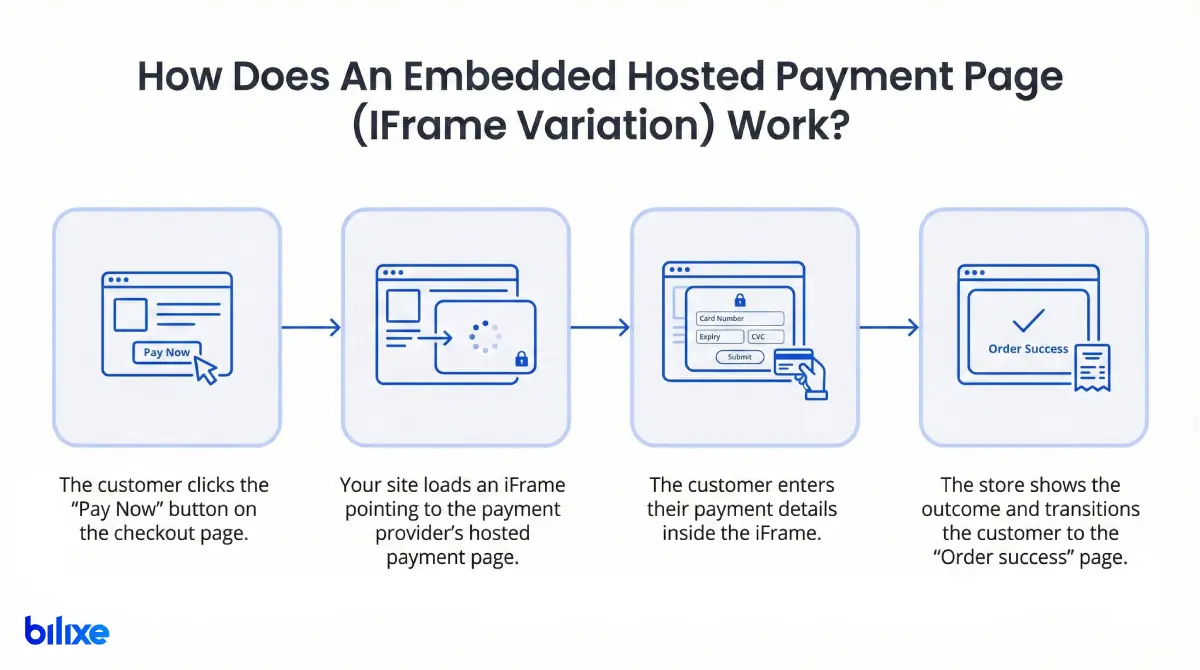
How An Embedded Hosted Payment Page (IFrame Variation) Works Infographic

How Does An Embedded Hosted Payment Page (IFrame Variation) Work?

  1. The customer clicks the “Pay Now” button on the checkout page.
  2. The store loads an IFrame pointing to the payment provider’s hosted payment page.
  3. The customer enters their payment details inside the IFrame.
  4. The store shows the outcome and transitions the customer to the “Order Success” page.

What is Payment API Integration?

API (Application Programming Interface) Integration, often referred to as “Direct Integration”, allows your website’s server to communicate directly with the payment gateway’s server.

In this case, the customer never leaves your website. You create the payment form yourself using HTML/CSS, giving you full control over the look and flow of the checkout. The payment data is sent via API calls in the background.

How A Payment API Integration Works Infographic

How Does A Payment API Integration Work?

  1. The customer clicks the “Pay Now” button and enters their payment details on the checkout page, without leaving the store’s domain.
  2. The store’s server receives the payment details and sends a request to the payment gateway’s API.
  3. The payment gateway processes the transaction.
  4. The gateway returns the result to the store’s backend.
  5. The store displays the outcome and redirects the customer to the “Order Success” page.

The Modern Middle Ground: UI Components

Because handling raw credit card data is risky, modern gateways like Stripe or Adyen offer “UI Components” or “Elements”. These are secure input fields that you can add to your custom form. They provide the appearance of API integration but handle data encryption securely like a hosted page.

Pros:

  • Seamless user experience (no redirects).
  • Full branding control.
  • Higher conversion rates for well-known brands.

Cons:

  • Requires skilled developers.
  • Higher security responsibility (PCI compliance).
  • You must maintain the code and update it when APIs change.

Expert Opinion: The “Hidden” Maintenance Cost

Experts at bilixe highlight that “manual maintenance” of APIs is not only about fixing bugs, it involves keeping up with regulations.

“When the EU introduced SCA (Strong Customer Authentication), merchants using Hosted Pages had their updates managed by the PSP automatically. Those with direct API integrations had to manually adjust their checkout processes to support 3D Secure 2.0, or they risked high transaction failure rates,” says Andrii K, CEO of bilixe.

Deep Dive: Security & PCI Compliance

This often influences small to mid-sized businesses. Every merchant accepting cards must comply with the Payment Card Industry Data Security Standard (PCI DSS). However, how you integrate determines how hard that compliance is.

Hosted Pages: The “Low Burden” Route

When you use a Hosted Payment Page, you never handle, process, or store raw card data. It goes directly to the PSP.

  • Compliance Level: Usually Self-Assessment Questionnaire A (SAQ A).
  • What it means: You fill out a simple self-assessment questionnaire. Your provider does most of the heavy lifting.

Note: Starting March 31, 2025, for embedded payment forms (iFrames), SAQ A requires merchants to confirm their page is secure against script attacks or to ensure the TPSP solution protects against them.

API Integration: The “High Responsibility” Route

If you create a direct API integration and your server handles the card data before sending it to the gateway, your compliance responsibilities increase.

  • Compliance Level: It may require Self-Assessment Questionnaire D (SAQ D).
  • What it means: This is a strict level where you might have to prove you have firewalls, file monitoring, strict access controls, and regular network scans.

Note: Using “UI Components/Tokenization” can lower this burden back to SAQ A-EP, but it is still more complex than a Hosted Page.

Deep Dive: User Experience (UX) & Conversion

Marketing teams typically prefer API integrations, while IT teams often lean toward Hosted Pages. And here is why.

The “Redirect” Friction

With a Hosted Page, the URL change can be unsettling. If a customer is shopping at cool-sneakers.com and suddenly sees payment-processor-global.net for entering their credit card, they may hesitate and abandon the cart.

Stat to know:

  • Baymard Institute estimates that the average cart abandonment rate is around 70%.
  • 19% of cart abandonments occur because users do not trust the site with their credit card information.
  • 18% of shoppers abandon carts due to a lengthy or complicated checkout process.

The Seamless Flow

API integrations allow for payments to appear “invisible”. You can add features such as:

  • One-click purchasing for returning customers.
  • Customized error messages (for example, “Your card number is one digit too short” instead of a generic “Error 500”).
  • Dynamic local payments that adjust based on the user’s IP address without reloading the page.

Stat to know:

  • According to Statista, mobile e-commerce now accounts for more than 60% of global retail sales. API integrations support Responsive Design and Biometric Authentication (FaceID/TouchID), which can be clunky or not possible on older Hosted Payment Pages.

Comparison: Development Time & Maintenance

Time-to-market is critical. How fast do you need to start taking payments?

FeatureHosted Payment PageAPI Integration
Setup SpeedFast (Days). Often “plug-and-play” with shopping carts.Slow (Weeks/Months). Requires custom front-end and back-end coding.
Dev CostsLow. Minimal developer hours needed.High. Requires senior dev time for build and testing.
MaintenanceAutomated. The PSP updates the page for you.Manual. You must update code for new features (e.g., adding Apple Pay).
FlexibilityLow. Stuck with the PSP’s layout.Unlimited. Build whatever flow you want.
Hosted Payment Pages vs. API Integration: Development Time & Maintenance

The Verdict: Which One Should You Choose?

There is no “best” method, It is all about what fits your current resources.
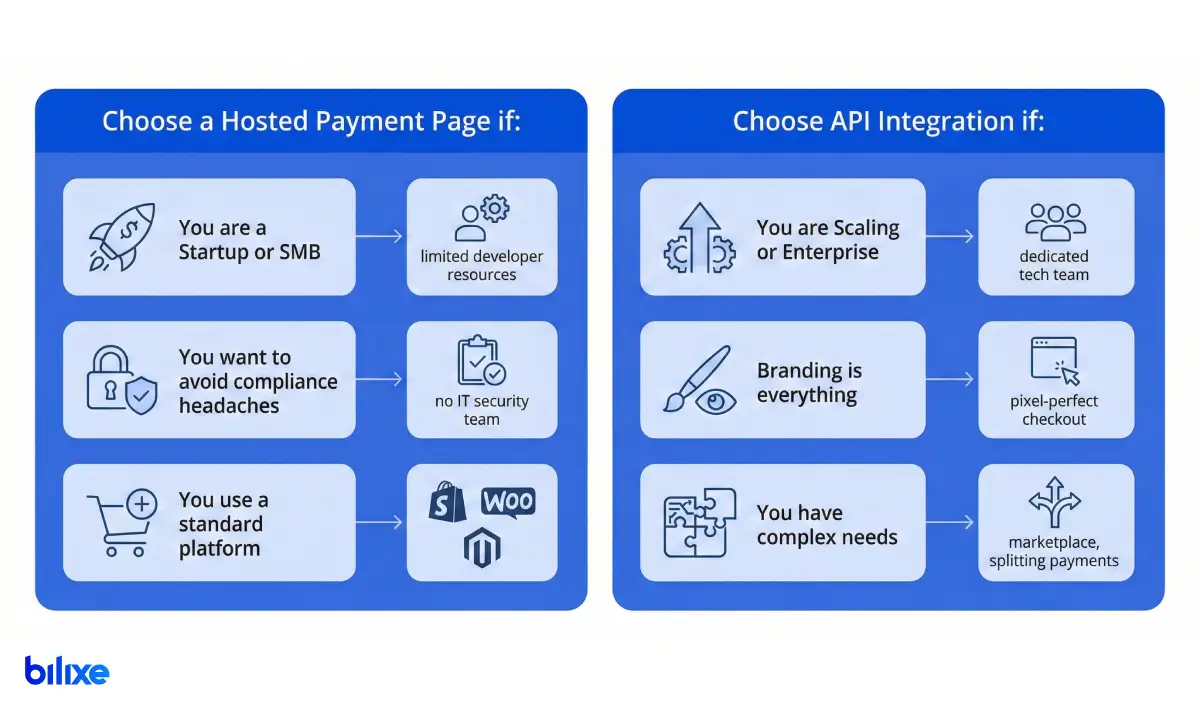
When to choose hosted payment page vs payment api integration infographic

Choose a Hosted Payment Page if:

  • You are a Startup or SMB: You have limited developer resources and need to launch immediately.
  • You want to avoid compliance headaches: You do not have an IT security team to manage SAQ D requirements.
  • You use a standard platform: You are on Shopify, WooCommerce, or Magento and want a simple plugin.

Choose API Integration if:

  • You are Scaling or Enterprise: You have a dedicated tech team.
  • Branding is everything: You need a pixel-perfect checkout that matches your app or website.
  • You have complex needs: You are running a marketplace, splitting payments, or need specific logic that a standard page cannot handle.

Conclusion

Your payment integration strategy is not set in stone. Many successful businesses start with a Hosted Payment Page to test their market, then switch to an API Integration when they have the revenue to support a development team.

Still deciding? Do not guess. Use bilixe, a directory of payment providers, to find payment services based on “Developer & Integration” options. Whether you need a basic hosted payment page or a more robust developer-first API, you can compare the top providers side-by-side.

FAQ: Hosted Payment Pages vs. API Integration

Recommended Articles

Find the Best Payment Service Provider for Your Business

Sign In

Register

Reset Password

Please enter your username or email address, you will receive a link to create a new password via email.